-
 EBS_Training
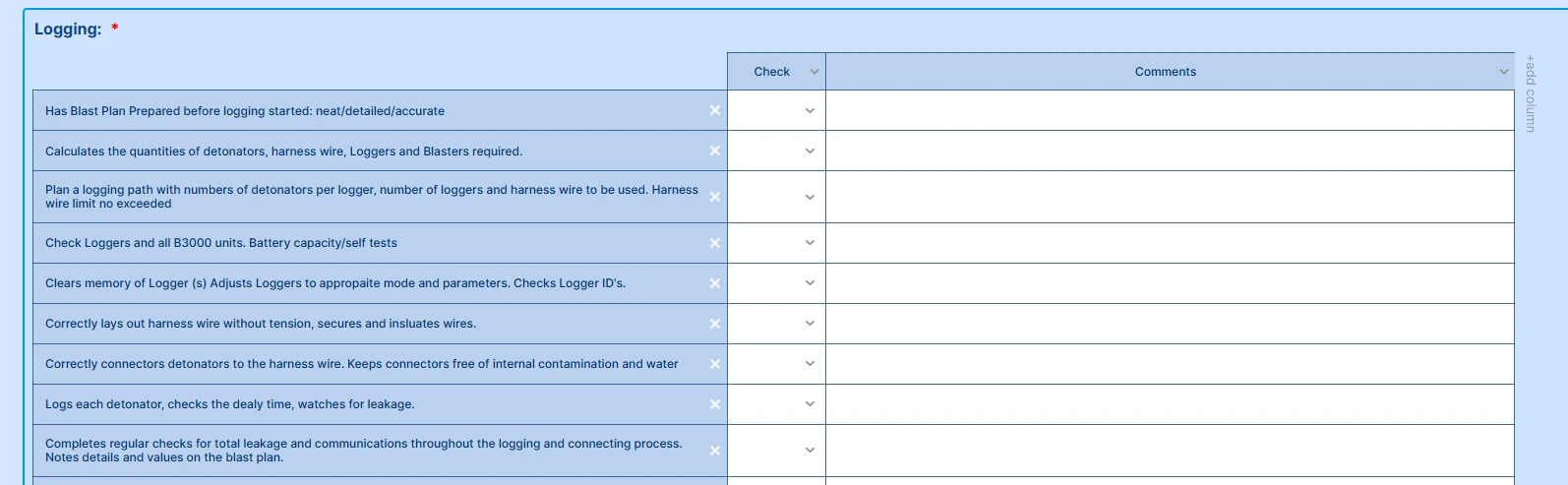
can i wrap the test in my comments section

-
 Podo: Support Specialist
Hi Orica,
Thanks for reaching out to Jotform Support. I'm an AI assistant here to assist you.
From your screenshot description, it looks like you have a table-style field with three columns (description / check / comments) and you want the text in the Comments column to wrap instead of running in a single line.
Let me help you with that:
- Open your form in Form Builder and select the field that contains the table (for example, an Input Table or similar element).
- Go to the field’s properties/settings panel and look for options related to the input type or cell width for the Comments column. If available, set the Comments cells to a text area / multi-line type instead of a single-line text.
- Adjust the column width so the Comments column is wider. If you still see the text staying on one line, you can use Advanced Designer to increase the overall field width so there’s more horizontal space for wrapping.
If you are using a different field type (for example, separate Short Text or Long Text fields for each comment) and the text still does not wrap as expected, please let us know which exact field type you are using or share a direct screenshot of the field’s settings so we can give more precise steps.
Give it a try and let us know how it goes.
-
 Sonnyfer Enterprise Support
Hi EBS_Training,
Thanks for reaching out to Jotform Support. Unfortuantely, there's no option to wrap the texts in input table at the moment While the feature you're looking for isn't available at Jotform right now, we've gone ahead and escalated your request to our developers. Exactly when or if it's developed depends on their workload, how viable it is, and how many other users also request it. If there are any updates, we’ll circle back to this thread and let you know.
Thanks for your patience and understanding, we appreciate it.

Your Reply
Something Went Wrong
An error occurred while generating the AI response. Please try again!