-
 raybullard
Hello,
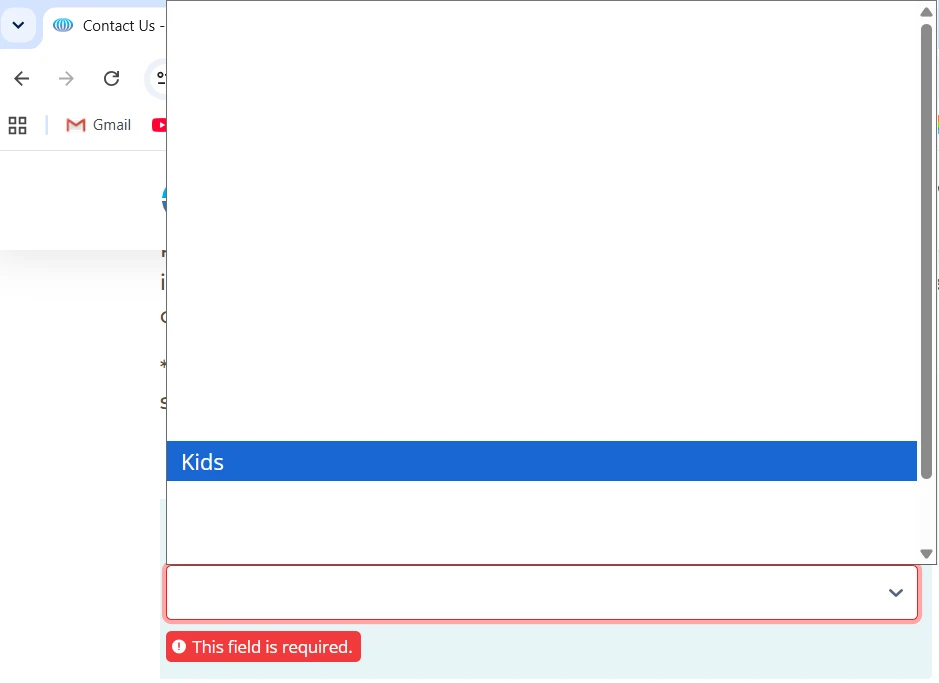
My client reported their site's contact form dropdown select is display as white text on white background. I'm unable to replicate this on my Macbook or iPhone, I've been told Android devices are also unaffected.
The client reported this from their windows machine, so this issue seems OS dependent? The issue is I'm able to QA to troubleshoot the issue. However, my colleague on Ubuntu was unable unable to replicate this issue, as well as my colleague on his windows machine, so I'm at a loss.
Even stranger, three other employees at the Port of Oakland have reported this issue since. So the issue isn't isolated to one box.
A few months ago I reported a similar issue where the form field placeholders were displaying as white on white. A helpful support engineer was able to fix the issue, I think they noted it was theme related?
Here are the affected forms:
https://www.portofoakland.com/about/contact-us
https://www.iflyoak.com/business/contact-us/
https://www.oaklandseaport.com/business/contact-us
We're hosting this site on Pantheon, using WordPress and Elementor. Please let me know if you need more information from me.
Thanks,
Alex
-
 Raymond JotForm Support
Hi Alex,
Thanks for reaching out to Jotform Support. I checked and tested your form and had the same issue. After checking further, we can change the color of the dropdown field options by Injecting CSS Codes into your form. Let me show you how:
1. First, copy this code:
/*change dropdown field options color*/
.form-dropdown {
  color: black !important;
}
2. In Form Builder, click on the Paint Roller icon on the upper-right side of the page.
3. Then, in the Form Designer menu on the right, go to the Styles tab.
4. Finally, paste the CSS code into the Inject Custom CSS code field.
Your Reply
Something Went Wrong
An error occurred while generating the AI response. Please try again!