-
 IonOpticks
I tried to update 2 factor authentication and now I can't access my account

-
 Podo: Support Specialist
Hi,
As I checked, you appear to be logged in, and there doesn’t seem to be any issue accessing your account. If you have another Jotform account, please submit your request without logging in to this account. If you meant something else, please briefly explain your request. Here are some account-related guides: How to Reset Your Jotform Password, How to Recover Your Jotform Account (if you have lost access to your account’s email) Here are some troubleshooting steps for email-related issues: Whitelisting Jotform IP Addresses and Domains,Troubleshooting Email Notifications. Also, if you have an Enterprise account, please contact your server administrator to reach out to dedicated Enterprise support.
Let us know if you have any other questions.
-
IonOpticks
I still cannot get any further than the verification page
-
Podo: Support Specialist
Hi IonOpticks,
Let me help you with that:
Since you cannot get past the verification page, the most reliable way to regain access is to reset your login and then, once you are in, review or disable Two-Factor Authentication (2FA) if needed.
First, reset your password (to ensure you can log in cleanly):
- Go to the Jotform Login page.
- Click on Forgot Password.
- Enter your Jotform username or the email address associated with the account, then click Send Reset Instructions.
- Check your email inbox for the password reset message and click Reset Password in that email.
- Set a new password and click Create a New Password, then try logging in again with the new password.
After you are able to log in, you can disable 2FA if it is causing issues:
- Click on your Profile Picture / Avatar in the upper-right corner of your Jotform Workspace.
- Select Settings.
- Go to the Security section.
- Toggle off the Two-Factor Authentication (2FA) option.
- Enter your password, click Verify, then click Yes, Disable 2FA to confirm.
If you try these steps and you are still stuck on the verification page, please describe what you see there (for example, whether it asks for a code, which method you selected, or if there is any error message). After we hear back from you, we’ll have a better idea of what’s going on and how to help.
Let us know if you have any other questions.
-
IonOpticks
The login page brings up 2FA again, which is not working for me
-
Podo: Support Specialist
Hi IonOpticks,
Let me help you with that:
Since 2FA is turning on every time you try to log in and it is not working for you, the only way to turn it off is after you successfully pass that 2FA screen at least once. Once you are able to get in, you can disable it so it will stop appearing on future logins.
After you manage to log in, here is how to disable 2FA:
- Click on your Profile Picture / Avatar at the top-right of your Jotform page.
- Select Settings from the menu.
- Go to the Security section on the left side.
- Toggle off the Two-Factor Authentication (2FA) option.
- Enter your password, click Verify, then click Yes, Disable 2FA to confirm.
To better understand why you cannot pass the verification page now, please let us know what exactly you see there: Is it asking for a 6-digit code from your authenticator app, a recovery/backup code, or something else, and is there any error message shown when you enter a code? After we hear back from you, we’ll have a better idea of what’s going on and how to help.
Let us know if you have any other questions.
-
IonOpticks
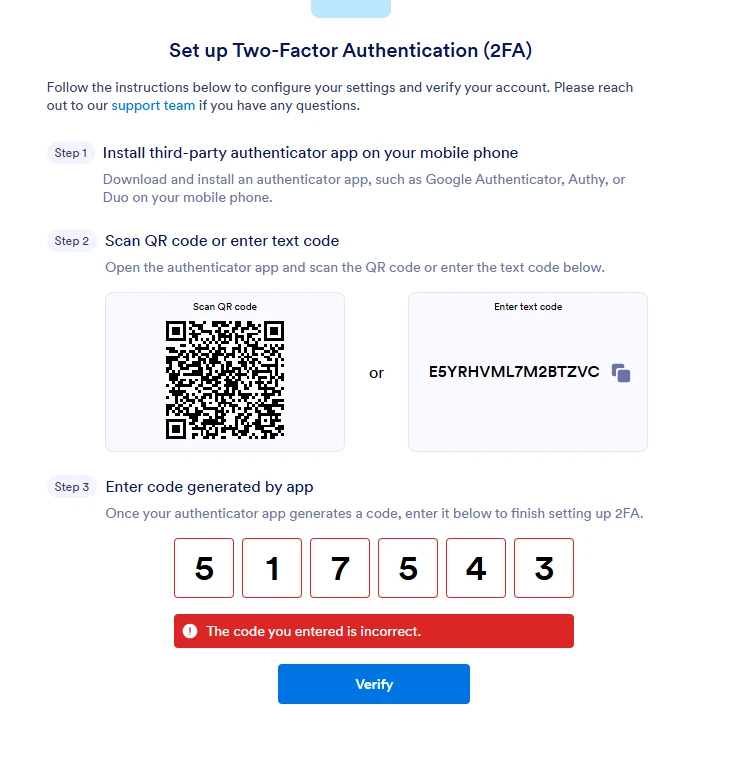
I cannot get past the 2FA screen, in order to login and disable 2FA. That is the entire problem. Your advice is completely unhelpful.
-
Podo: Support Specialist
Hi IonOpticks,
One of our Support Team members will take it from here to follow up shortly.
Reach out again if you need any other help.
-
 Sonnyfer Enterprise Support
Hi IonOpticks,
I understand you're stuck at the verification screen when setting up the 2FA even though you have the correct code entered. I created a ticket and escalated this to our Developers. Although we don't know exactly when it'll be fixed, we’ll circle back to this thread when we have an update.

Your Reply
Something Went Wrong
An error occurred while generating the AI response. Please try again!