Team Request App Template is an app template designed to simplify the process of internal request submission and approval within organizations. This template is purpose-built to streamline the submission of various types of requests such as resource acquisition or issue resolution, transforming a potentially chaotic process into a structured, organized workflow. With its built-in tracking system, this template allows managers and HR teams to effortlessly manage approvals and keep tabs on the status of all requests, eliminating the need for back-and-forth emails or manual tracking methods. The Team Request App Template is ideally suited for teams, departments, and organizations that deal with high volumes of internal requests. This powerful app template not only enhances clarity and consistency in request handling but also ensures a more complete and efficient collection of request-related information.
Jotform's offerings enhance the value provided by the Team Request App Template. With Jotform's no-code app builder, users can custom-fit the template to their specific needs through a visual drag-and-drop interface. It allows convenient customization of forms, addition of widgets, and modification of links to create a single, consolidated interface. The app, with its cross-platform compatibility, seamlessly functions across smartphones, tablets, and desktops, making it more accessible for all users. Moreover, if the app is used to request paid resources or services, Jotform Apps' integration with 25+ payment processors can be employed to facilitate transactions directly within the app. The publish options provided by Jotform also allow users to control the accessibility of the app, offering settings such as Public, Private, or Company-only. With its powerful features and flexibility, Jotform makes the Team Request App Template an effective solution to streamline and simplify internal request handling within organizations.
Related templates

It Help Desk App
It Help Desk App gives teams a clear place to route internal tech issues and keep requests from getting lost in chat threads and inboxes. Employees can submit a ticket, check their open tickets, and review request details like priority and issue type in one simple experience. It works well for IT departments, managed service teams, and fast-growing companies that need a consistent way to capture problems, assign attention, and follow up without confusion.With Jotform App Templates, you can publish a self-service help desk that connects pages, buttons, and lists to the forms and tables behind your process. Build and update your workflow in a no-code app builder with a drag-and-drop interface, then share the app as a single link for quick access on any device. Jotform supports reliable data collection and organized request tracking, so your team can spend less time searching for context and more time resolving issues.
Go to Category:Information Technology Apps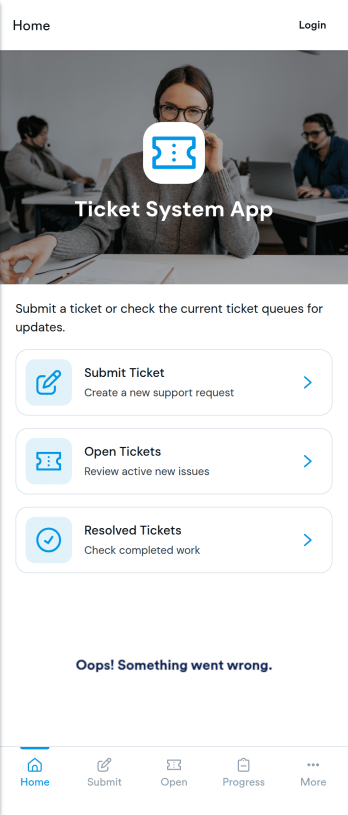
Ticket System App
A ticket system app gives teams one place to capture requests, track progress, and keep support work organized from the first report to the final resolution. This Ticket System App works well for IT help desks, customer support teams, facilities departments, and internal operations groups that handle recurring issues and questions. Users can submit new tickets, browse open tickets, and review resolved tickets so nothing gets lost in email threads. It’s especially useful when multiple people need visibility into what’s being worked on and which requests still need follow-up.Jotform makes it easy to turn this workflow into a shareable, branded experience using App Templates and a no-code app builder. With a drag-and-drop interface, you can adjust navigation, add helpful content, and connect your ticket form to the app for consistent data collection. Publish the app as a self-service hub for employees or customers, keep ticket details accessible in one place, and update the experience as your workflow evolves.
Go to Category:Information Technology Apps
Knowledgebase App
Knowledgebase App gives teams a simple, searchable place to publish help articles and guide users to answers without extra emails. It’s ideal for customer support teams, IT departments, HR, and operations groups that need to share consistent instructions, troubleshooting steps, or internal how-to documentation. Users can browse articles, open an article details view for deeper guidance, and submit a request when they can’t find what they need, so questions don’t get lost and support stays organized.With Jotform, you can turn this knowledgebase app template into a branded self-service experience using a no-code app builder and a drag-and-drop interface. Connect your article list to Jotform Tables for easy updates, and link the request form to your workflow so the right people are notified and can follow up quickly. Share the app by link or QR code to make trusted information accessible on any device while keeping your data collection consistent across teams.
Go to Category:Resource & Learning Portal Apps
IT Operation Checklist App
An IT operation checklist app is used by IT departments for documenting routine operations and maintenance. This free app template from Jotform is a great way for IT departments to keep track of system servers, network status, and equipment maintenance. With an included IT Operation Checklist Form, IT associates can fill out and digitally sign a daily, weekly, or monthly general operations checklist. Supervisors and employees can also request new IT jobs with a Job Work Order Form, and specify a starting date, tools and requirements, and upload any relevant images and documentation. Equipment maintenance submissions are stored in an Equipment Maintenance Log, which you can sort, filter, and search from your secure Jotform account.You can easily make changes to this IT Operation Checklist App with Jotform’s intuitive app builder. No coding required — simply drag and drop to add or swap out form elements, edit checklist items, choose fonts and colors, create a custom app icon and splash screen, upload your own branding, and much more. Once you’re finished, share your custom app with other IT associates by sending email invites, or by embedding it in an internal website. Create an all-in-one app for routine IT work with this IT Operation Checklist App that works on any device.
Go to Category:Checklist Apps
Gps Field Testing App
A GPS field testing app is used by GPS businesses for adjusting and servicing location data. Our GPS Field Testing App is a convenient way for field employees to create on-site GPS testing reports using a Field Testing Form and a Task Log Form. Employees can document device configuration, weather conditions, and note any obstructions. There is also space to record additional notes and upload photos of the sites. Reports are synced and stored in your secure Jotform account so you can keep them organized in one centralized location.Want to make this app template your own? No problem — just use our drag-and-drop app builder to customize the perfect app in seconds. Without any coding, you can add or change form elements, edit text fields and checklist items, choose fonts and colors, upload your branding, and more. Sharing your app by sending email invites or the app link, and employees can start filling out forms right away on any device. Ditch the paperwork and go digital with this free GPS Field Testing App from Jotform.
Go to Category:Engineering Apps
It Support App
It Support App helps teams centralize everyday IT help desk requests so employees can report issues, check service status, and find answers without guessing who to contact. It works well for internal IT departments, MSPs supporting multiple clients, and operations teams that need a simple front door for support. With clear entry points for creating a new ticket, browsing a knowledge base, and viewing service status updates, the app reduces repeated questions and keeps requests organized from the start.Built with Jotform App Templates, this app template can be tailored in a no-code app builder with a drag-and-drop interface, so you can adjust pages, labels, and navigation to match your support process. Connect ticket intake to Jotform forms and route responses into workflows your team already follows, then share the app via link or QR code for easy self-service on any device. As requests grow, Jotform helps you keep data collection consistent and make support interactions faster for both employees and IT staff.
Go to Category:Information Technology Apps