Wenn Sie bereits mit Jotform Webhooks vertraut sind, finden Sie hier einige Beispielskripte, die Sie ausprobieren können. Vergessen Sie nicht, die Feldnamen in diesen Skripten mit den Feldnamen aus Ihrem Formular zu aktualisieren.
Sofortige E-Mail-Benachrichtigung
Dies ist ein E-Mail-Benachrichtigungsskript für Webhooks, das dies eingebaute Mail-Funktion von PHP verwendet. Erhalten Sie fortige E-Mail-Benachrichtigungen über Ihren E-Mail-Versandserver.
<?php
// Convert JSON data to PHP
$result = $_REQUEST['rawRequest'];
$obj = json_decode($result, true);

// Change with your emails
$emailfrom = "john@example.com"; // Sender or From Email
$emailto = "paul@example.com"; // Recipient, you can predefine or use a field value e.g. $obj['q4_email']
$subject = "You've got a new submission"; // Email Subject Title

// Do not edit
$id = $_POST['submissionID']; // Get submission ID
$submissionURL = '/jf/www.jotform.com/submission/'.$id; // Construct submission URL

$headers = "From: " . $emailfrom . "\r\n";
$headers .= "Reply-To: ". $emailfrom . "\r\n"; // Optional
$headers .= "MIME-Version: 1.0\r\n";
$headers .= "Content-Type: text/html; charset=utf-8\r\n";

// New method, get data from the submissions page
$html = new DOMDocument;
$html->loadHTML(file_get_contents($submissionURL));
$body = $html->getElementsByTagName('body')->item(0);
// get html code after the body tag
foreach ($body->childNodes as $child){
    $html->appendChild($html->importNode($child, true));
}
// make the table responsive so it appears nicely on email
$body = $html->getElementsByTagName('table');
foreach ($body as $width) {
    $width->setAttribute('width', '100%');
}
$body = $html->saveHTML();

// Send email
@mail($emailto, $subject, $body, $headers);
?>
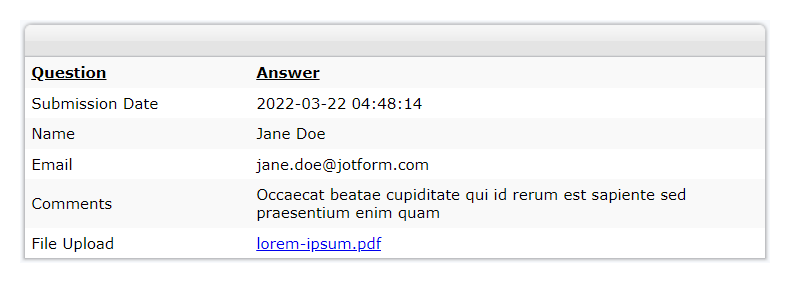
Beispiel-E-Mail:
SMS-Benachrichtigung
Versenden Sie eine SMS nach dem Absenden des Formulars mithilfe der API Ihres SMS-Anbieters.
<?php
// Catch form field values
$result = $_REQUEST['rawRequest'];
$obj = json_decode($result, true);

// Replace your authentication key & credentials
$authKey = "your_auth_key";
$senderId = "102234";
$route = "default";

// Replace your form field names
$mobileNumber = $obj['q1_mobileNo']; // mobile no. from form data
$message = urlencode($obj['q2_message']); // message from form data

// Prepare you post parameters
$postData = array(
    'authkey' => $authKey,
    'mobiles' => $mobileNumber,
    'message' => $message,
    'sender' => $senderId,
    'route' => $route
);

// Replace your API endpoint
$url = "http://mysmsapiproviders.com/sendhttp.php";

// init the resource
$ch = curl_init();
curl_setopt_array($ch, array(
    CURLOPT_URL => $url,
    CURLOPT_RETURNTRANSFER => true,
    CURLOPT_POST => true,
    CURLOPT_POSTFIELDS => $postData
    // ,CURLOPT_FOLLOWLOCATION => true

));

// Ignore SSL certificate verification
curl_setopt($ch, CURLOPT_SSL_VERIFYHOST, 0);
curl_setopt($ch, CURLOPT_SSL_VERIFYPEER, 0);

// get response
$output = curl_exec($ch);

// Print error if any
if (curl_errno($ch)) {
    echo 'error:' . curl_error($ch);
}

curl_close($ch);
echo $output;
?>
<?php
// Catch form field values
$result = $_REQUEST['rawRequest'];
$obj = json_decode($result, true);

// Replace your authentication key & credentials
$authKey = "your_auth_key";
$senderId = "102234";
$route = "default";

// Replace your form field names
$mobileNumber = $obj['q1_mobileNo']; // mobile no. from form data
$message = urlencode($obj['q2_message']); // message from form data

// Prepare you post parameters
$postData = array(
    'authkey' => $authKey,
    'mobiles' => $mobileNumber,
    'message' => $message,
    'sender' => $senderId,
    'route' => $route
);

// Replace your API endpoint
$url = "http://mysmsapiproviders.com/sendhttp.php";

// init the resource
$ch = curl_init();
curl_setopt_array($ch, array(
    CURLOPT_URL => $url,
    CURLOPT_RETURNTRANSFER => true,
    CURLOPT_POST => true,
    CURLOPT_POSTFIELDS => $postData
    // ,CURLOPT_FOLLOWLOCATION => true

));

// Ignore SSL certificate verification
curl_setopt($ch, CURLOPT_SSL_VERIFYHOST, 0);
curl_setopt($ch, CURLOPT_SSL_VERIFYPEER, 0);

// get response
$output = curl_exec($ch);

// Print error if any
if (curl_errno($ch)) {
    echo 'error:' . curl_error($ch);
}

curl_close($ch);
echo $output;
?>
Formular zu MySQL
Formular daten an Ihre Ihre MySQL-Datenbank senden.
<?php
// Replace with your DB details
$servername = "localhost";
$username = "your_username_here";
$password = "your_password_here";
$dbname = "your_dbname_here";
$dbtable = "your_dbtable_here";

// Create connection
$mysqli = new mysqli($servername, $username, $password, $dbname);

// Check connection
if ($mysqli->connect_error) {
    die("Connection failed: " . $mysqli->connect_error);
}

// Get field values from the form
// Get unique submissionID - nothing to change here
$sid = $mysqli->real_escape_string($_REQUEST["submissionID"]);

// Get form field values and decode - nothing to change here
$fieldvalues = $_REQUEST["rawRequest"];
$obj = json_decode($fieldvalues, true);

// Replace the field names from your form here
$fname = $mysqli->real_escape_string($obj["q15_yourName"][first]);
$lname = $mysqli->real_escape_string($obj["q15_yourName"][last]);
$email = $mysqli->real_escape_string($obj["q16_yourEmail16"]);
$message = $mysqli->real_escape_string($obj["q17_yourMessage"]);

$result = $mysqli->query("SELECT * FROM $dbtable WHERE sid = '$sid'");

// If submission ID exists, update the record...
if ($result->num_rows > 0) {
    $result = $mysqli->query(
        "UPDATE $dbtable SET firstname = '$fname', lastname = '$lname', email = '$email', message = '$message' WHERE sid = '$sid'"
    );
    echo "Existing Record Updated!";
}
// else, insert record
else {
    $result = $mysqli->query(
        "INSERT IGNORE INTO $dbtable (sid, firstname, lastname, email, message) VALUES ('$sid', '$fname', '$lname','$email','$message')"
    );
    echo "New Record Added!";
    if ($result === false) {
        echo "SQL error:" . $mysqli->error;
    }
}

$mysqli->close();
?>
Bounce-Benachrichtigung
Erhalten Sie eine Benachrichtigung, wenn ein E-Mail-Zustellfehler oder ein Bounceback auftritt. Das folgende Skript nutzt den Standard-SMTP Ihres Webhosts, um E-Mails zu senden. Stellen Sie also sicher, dass Ihr Webhost dies unterstützt. Anderfalls funktionert die Mail-Funktion nicht.
Dieser Code erfordert die PHP-Client-Bibliothek von der Jotform API-Seite. Platzieren Sie die Datei JotForm.php im gleichen Ordner wie Ihre Bounce-Notifier-PHP-Datei.
<?php
include "JotForm.php";

$jotformAPI = new Jotform("Your Jotform API Key here"); // Put your API Key here
$history = $jotformAPI->getHistory("emails", "lastWeek");
$subid = $_REQUEST["submissionID"];
$submissionURL = "/jf/www.jotform.com/submission/" . $subid; // Construct submission URL

$limit = 1; // send the last failed notification - increase the number if you have multiple notifications

$results = [];

// Your emails here
$to = "john@example.com"; // Replace with your recipient email
$from = "paulsmith@example.com"; // Replace with your FROM email

// Change the subject title if you like
$subject = "Message bounced.";

// Don't edit
$headers = "MIME-Version: 1.0" . "\r\n";
$headers .= "Content-type:text/html;charset=UTF-8" . "\r\n";
$headers .= "From: <" . $from . ">" . "\r\n";

// Additional body message here (optional)
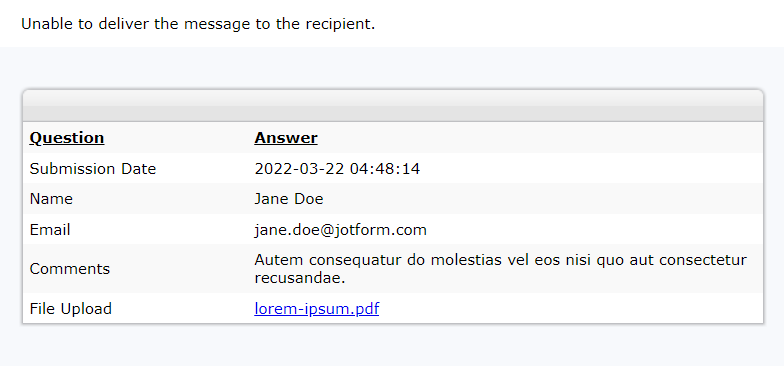
$msg1 = "Unable to deliver the message to the recipient.";

// New method, get data from the submissions page
$html = new DOMDocument();
$html->loadHTML(file_get_contents($submissionURL));
$body = $html->getElementsByTagName("body")->item(0);

// Get the HTML code after the body tag
foreach ($body->childNodes as $child) {
    $html->appendChild($html->importNode($child, true));
}

// Make the table responsive so it appears nicely on email
$body = $html->getElementsByTagName("table");
foreach ($body as $width) {
    $width->setAttribute("width", "100%");
}

// Don't edit anything from here unless you know what you're doing
foreach ($history as $key => $value) {
    if (
        $value["status"] == "IN BOUNCE/BLOCK LIST" ||
        ($value["status"] == "FAILED" && $value["submissionID"] == $subid)
    ) {
        if ($key == $limit - 1) {
            $body = $msg1 . "<br>";
            $body .= $html->saveHTML();
            @mail($to, $subject, $body, $headers);
        }
    }
}
?>
Beispiel-E-Mail:
Wir werden von Zeit zu Zeit weitere Beispiele veröffentlichen. Wenn Sie Vorschläge haben oder Hilfe mit Webhooks benötigen, können Sie diese gerne unten posten.

Kommentar abschicken: