إذا كنت على دراية مسبقة بـ Webhooks في Jotform، فإليك بعض النصوص البرمجية النموذجية التي قد ترغب في تجربتها. تأكد من تحديث أسماء الحقول في هذه النصوص البرمجية لتتطابق مع أسماء الحقول الموجودة في نموذجك.
إشعار فوري عبر البريد الإلكتروني
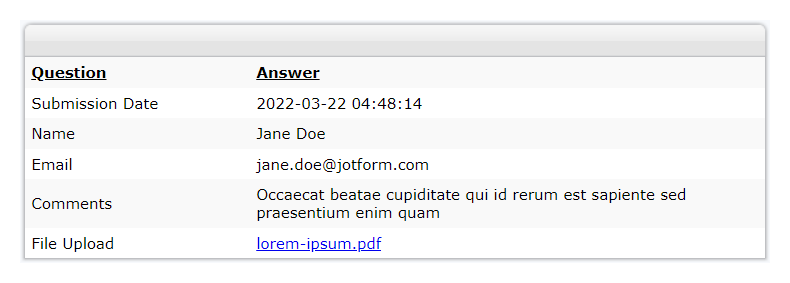
هذا نص برمجي لإشعارات البريد الإلكتروني الخاصة بـ Webhook باستخدام دالة mail المدمجة في PHP. احصل على إشعارات فورية عبر البريد الإلكتروني باستخدام خادم إرسال البريد الإلكتروني الخاص بك.
<?php
// Convert JSON data to PHP
$result = $_REQUEST['rawRequest'];
$obj = json_decode($result, true);
// Change with your emails
$emailfrom = "john@example.com"; // Sender or From Email
$emailto = "paul@example.com"; // Recipient, you can predefine or use a field value e.g. $obj['q4_email']
$subject = "You've got a new submission"; // Email Subject Title
// Do not edit
$id = $_POST['submissionID']; // Get submission ID
$submissionURL = '/jf/www.jotform.com/submission/'.$id; // Construct submission URL
$headers = "From: " . $emailfrom . "\r\n";
$headers .= "Reply-To: ". $emailfrom . "\r\n"; // Optional
$headers .= "MIME-Version: 1.0\r\n";
$headers .= "Content-Type: text/html; charset=utf-8\r\n";
// New method, get data from the submissions page
$html = new DOMDocument;
$html->loadHTML(file_get_contents($submissionURL));
$body = $html->getElementsByTagName('body')->item(0);
// get html code after the body tag
foreach ($body->childNodes as $child){
$html->appendChild($html->importNode($child, true));
}
// make the table responsive so it appears nicely on email
$body = $html->getElementsByTagName('table');
foreach ($body as $width) {
$width->setAttribute('width', '100%');
}
$body = $html->saveHTML();
// Send email
@mail($emailto, $subject, $body, $headers);
?>مثال على رسالة بريد إلكتروني:
إشعار عبر الرسائل القصيرة
أرسل رسالة SMS بعد إرسال النموذج باستخدام واجهة API الخاصة بمزوّد خدمة الرسائل النصية لديك.
<?php
// Catch form field values
$result = $_REQUEST['rawRequest'];
$obj = json_decode($result, true);
// Replace your authentication key & credentials
$authKey = "your_auth_key";
$senderId = "102234";
$route = "default";
// Replace your form field names
$mobileNumber = $obj['q1_mobileNo']; // mobile no. from form data
$message = urlencode($obj['q2_message']); // message from form data
// Prepare you post parameters
$postData = array(
'authkey' => $authKey,
'mobiles' => $mobileNumber,
'message' => $message,
'sender' => $senderId,
'route' => $route
);
// Replace your API endpoint
$url = "http://mysmsapiproviders.com/sendhttp.php";
// init the resource
$ch = curl_init();
curl_setopt_array($ch, array(
CURLOPT_URL => $url,
CURLOPT_RETURNTRANSFER => true,
CURLOPT_POST => true,
CURLOPT_POSTFIELDS => $postData
// ,CURLOPT_FOLLOWLOCATION => true
));
// Ignore SSL certificate verification
curl_setopt($ch, CURLOPT_SSL_VERIFYHOST, 0);
curl_setopt($ch, CURLOPT_SSL_VERIFYPEER, 0);
// get response
$output = curl_exec($ch);
// Print error if any
if (curl_errno($ch)) {
echo 'error:' . curl_error($ch);
}
curl_close($ch);
echo $output;
?><?php
// Catch form field values
$result = $_REQUEST['rawRequest'];
$obj = json_decode($result, true);
// Replace your authentication key & credentials
$authKey = "your_auth_key";
$senderId = "102234";
$route = "default";
// Replace your form field names
$mobileNumber = $obj['q1_mobileNo']; // mobile no. from form data
$message = urlencode($obj['q2_message']); // message from form data
// Prepare you post parameters
$postData = array(
'authkey' => $authKey,
'mobiles' => $mobileNumber,
'message' => $message,
'sender' => $senderId,
'route' => $route
);
// Replace your API endpoint
$url = "http://mysmsapiproviders.com/sendhttp.php";
// init the resource
$ch = curl_init();
curl_setopt_array($ch, array(
CURLOPT_URL => $url,
CURLOPT_RETURNTRANSFER => true,
CURLOPT_POST => true,
CURLOPT_POSTFIELDS => $postData
// ,CURLOPT_FOLLOWLOCATION => true
));
// Ignore SSL certificate verification
curl_setopt($ch, CURLOPT_SSL_VERIFYHOST, 0);
curl_setopt($ch, CURLOPT_SSL_VERIFYPEER, 0);
// get response
$output = curl_exec($ch);
// Print error if any
if (curl_errno($ch)) {
echo 'error:' . curl_error($ch);
}
curl_close($ch);
echo $output;
?>من النموذج إلى MySQL
أرسل بيانات النموذج إلى قاعدة بيانات MySQL الخاصة بك.
<?php
// Replace with your DB details
$servername = "localhost";
$username = "your_username_here";
$password = "your_password_here";
$dbname = "your_dbname_here";
$dbtable = "your_dbtable_here";
// Create connection
$mysqli = new mysqli($servername, $username, $password, $dbname);
// Check connection
if ($mysqli->connect_error) {
die("Connection failed: " . $mysqli->connect_error);
}
// Get field values from the form
// Get unique submissionID - nothing to change here
$sid = $mysqli->real_escape_string($_REQUEST["submissionID"]);
// Get form field values and decode - nothing to change here
$fieldvalues = $_REQUEST["rawRequest"];
$obj = json_decode($fieldvalues, true);
// Replace the field names from your form here
$fname = $mysqli->real_escape_string($obj["q15_yourName"][first]);
$lname = $mysqli->real_escape_string($obj["q15_yourName"][last]);
$email = $mysqli->real_escape_string($obj["q16_yourEmail16"]);
$message = $mysqli->real_escape_string($obj["q17_yourMessage"]);
$result = $mysqli->query("SELECT * FROM $dbtable WHERE sid = '$sid'");
// If submission ID exists, update the record...
if ($result->num_rows > 0) {
$result = $mysqli->query(
"UPDATE $dbtable SET firstname = '$fname', lastname = '$lname', email = '$email', message = '$message' WHERE sid = '$sid'"
);
echo "Existing Record Updated!";
}
// else, insert record
else {
$result = $mysqli->query(
"INSERT IGNORE INTO $dbtable (sid, firstname, lastname, email, message) VALUES ('$sid', '$fname', '$lname','$email','$message')"
);
echo "New Record Added!";
if ($result === false) {
echo "SQL error:" . $mysqli->error;
}
}
$mysqli->close();
?>إشعارات ارتداد البريد الإلكتروني
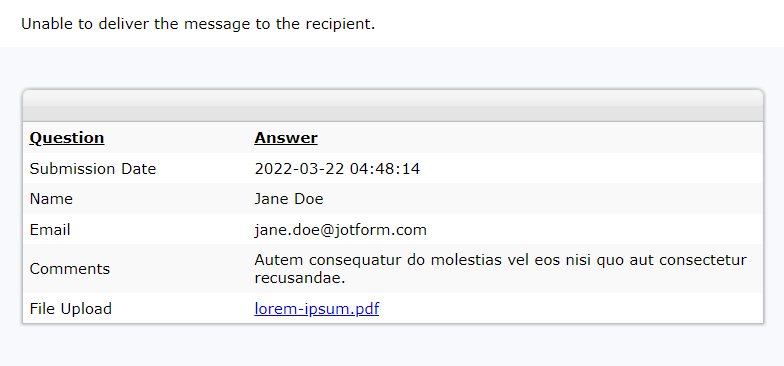
احصل على إشعار عند حدوث فشل في تسليم البريد الإلكتروني أو ارتداد الرسالة. سيستخدم النص البرمجي التالي خادم SMTP الافتراضي الخاص باستضافة الويب لديك لإرسال رسائل البريد الإلكتروني، لذا تأكد من أن مزود الاستضافة يدعم ذلك. وإلا فلن تعمل دالة mail.
يتطلب هذا الكود مكتبة PHP Client Library من صفحة Jotform API. ضع ملف JotForm.php داخل المجلد نفسه الذي يحتوي على ملف PHP الخاص بإشعارات ارتداد البريد الإلكتروني.
<?php
include "JotForm.php";
$jotformAPI = new Jotform("Your Jotform API Key here"); // Put your API Key here
$history = $jotformAPI->getHistory("emails", "lastWeek");
$subid = $_REQUEST["submissionID"];
$submissionURL = "/jf/www.jotform.com/submission/" . $subid; // Construct submission URL
$limit = 1; // send the last failed notification - increase the number if you have multiple notifications
$results = [];
// Your emails here
$to = "john@example.com"; // Replace with your recipient email
$from = "paulsmith@example.com"; // Replace with your FROM email
// Change the subject title if you like
$subject = "Message bounced.";
// Don't edit
$headers = "MIME-Version: 1.0" . "\r\n";
$headers .= "Content-type:text/html;charset=UTF-8" . "\r\n";
$headers .= "From: <" . $from . ">" . "\r\n";
// Additional body message here (optional)
$msg1 = "Unable to deliver the message to the recipient.";
// New method, get data from the submissions page
$html = new DOMDocument();
$html->loadHTML(file_get_contents($submissionURL));
$body = $html->getElementsByTagName("body")->item(0);
// Get the HTML code after the body tag
foreach ($body->childNodes as $child) {
$html->appendChild($html->importNode($child, true));
}
// Make the table responsive so it appears nicely on email
$body = $html->getElementsByTagName("table");
foreach ($body as $width) {
$width->setAttribute("width", "100%");
}
// Don't edit anything from here unless you know what you're doing
foreach ($history as $key => $value) {
if (
$value["status"] == "IN BOUNCE/BLOCK LIST" ||
($value["status"] == "FAILED" && $value["submissionID"] == $subid)
) {
if ($key == $limit - 1) {
$body = $msg1 . "<br>";
$body .= $html->saveHTML();
@mail($to, $subject, $body, $headers);
}
}
}
?>نموذج لرسالة بريد إلكتروني:
سننشر المزيد من الأمثلة من حين لآخر. إذا كانت لديكم أي اقتراحات أو كنتم بحاجة إلى مساعدة بشأن Webhooks، فلا تترددوا في نشرها أدناه.

كتابة تعليق: